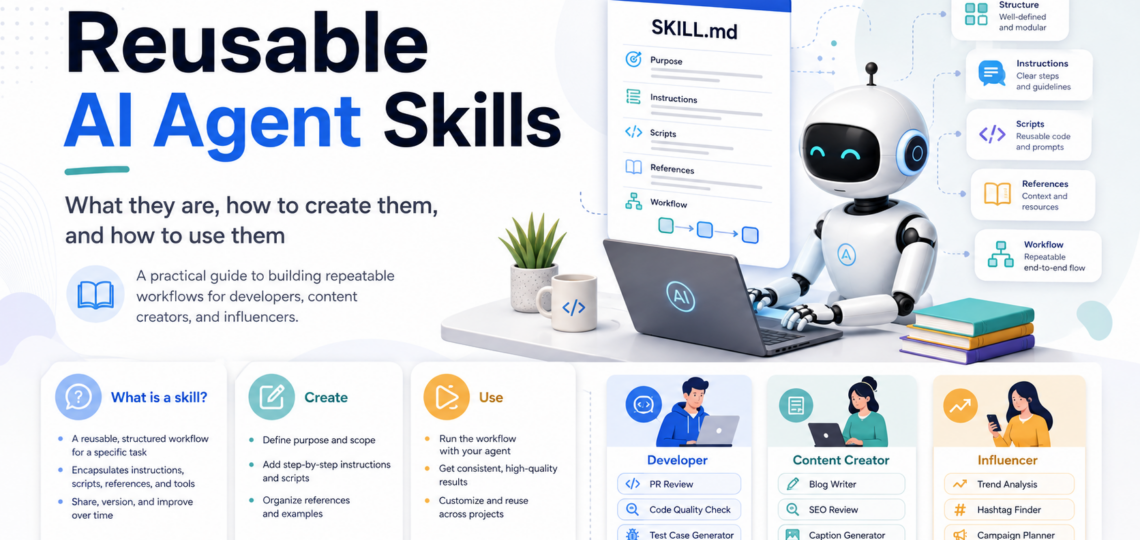
Building Reusable AI Agent Workflows with SKILL.md
AI agents become substantially more useful when they can follow repeatable operating procedures instead of reconstructing the same workflow from a fresh prompt every time. Agent Skills provide a structured way to package those procedures so they can be discovered, loaded, reused, tested, versioned, and shared.
This guide explains what skills are, how they work, how to create them, how to use them safely, and which skills are especially useful for developers, content creators, and influencers.
What is an AI agent skill?
An AI agent skill is a reusable capability for a specific class of tasks. It combines instructions with optional scripts, references, templates, examples, and other resources.
A skill normally lives in its own directory. Its entry point is a file named SKILL.md.
my-skill/
├── SKILL.md
├── scripts/
├── references/
└── assets/
Only SKILL.md is required. The additional directories are optional.
A useful distinction is:
A prompt describes what to do once. A skill defines how to perform a recurring task consistently.
A good skill should answer six questions:
- What task does this skill perform?
- When should the agent use it?
- What inputs does it require?
- Which steps should the agent follow?
- What output should it produce?
- What should happen when information, permissions, or tools are missing?
Skills are more than saved prompts
A saved prompt can be useful, but it is usually just a block of text. A skill is closer to an executable playbook.
| Saved prompt | Agent skill |
|---|---|
| Usually one block of instructions | Structured directory with an entry file and resources |
| Manually pasted or selected | Can be discovered and activated automatically |
| Often lacks versioning or tests | Can be stored in Git and reviewed like source code |
| Limited supporting context | Can include references, scripts, templates, and examples |
| Often tied to one conversation | Designed for repeated use across projects or tools |
Skills are most valuable when a task has several steps, a strict output format, a quality checklist, organization-specific rules, or supporting resources that should not be pasted into every conversation.
What belongs in a skill?
1. Metadata
Metadata tells the host and the agent what the skill is called and when it is relevant.
The two required fields are normally:
namedescription
Example:
---
name: review-pr
description: Reviews pull requests for correctness, security risks, breaking changes, and missing tests. Use when reviewing a pull request, code diff, or proposed change.
---
The description is effectively the routing rule. It should contain both the capability and the situations in which the skill should activate.
Weak description:
description: Helps with reviews.
Better description:
description: Reviews pull requests for correctness, security risks, breaking changes, and missing tests. Use when reviewing a pull request, code diff, or proposed change.
2. Operational instructions
The Markdown body describes the workflow.
# Objective

Return a risk-focused review of the proposed change.

# Procedure

1. Summarize the intended behavior.
2. Inspect correctness and edge cases.
3. Check authentication, authorization, validation, and secret handling.
4. Identify API, schema, or configuration compatibility risks.
5. Evaluate tests and missing coverage.
6. Return findings ordered by severity with precise file references.
3. Scripts
Scripts are useful for deterministic work such as:
- validation;
- linting;
- data conversion;
- report generation;
- repository checks;
- extracting structured information.
Example structure:
scripts/
├── run-tests.sh
├── validate-schema.py
└── generate-report.js
Use scripts when a task should be reproducible. Do not replace every reasoning step with a script; analysis and judgment usually belong in the instructions.
4. References
Reference files hold information that is only needed in some situations:
references/
├── security-policy.md
├── api-conventions.md
├── editorial-style.md
└── campaign-rules.md
Keeping long references outside SKILL.md supports progressive disclosure and reduces unnecessary context usage.
5. Assets and templates
Assets can include:
- output templates;
- example documents;
- schemas;
- checklists;
- image briefs;
- data files;
- boilerplate configurations.
Example:
assets/
├── review-report-template.md
├── article-template.md
└── campaign-brief.yaml
How skills work
A typical skill lifecycle has four stages.
Stage 1: Discovery
The host scans configured skill locations and reads only lightweight metadata such as the skill name and description.
Stage 2: Selection
The agent compares the current task with available descriptions. A skill can be selected automatically, or the user can request it explicitly.
Stage 3: Loading
The full SKILL.md body is loaded only after the skill is selected. Supporting files are loaded only when the workflow calls for them.
Stage 4: Execution
The agent follows the workflow, uses permitted tools, reads references, runs scripts where appropriate, and produces the required output.
This model is called progressive disclosure. It allows an agent to have many skills available without loading all instructions into every session.
When should you create a skill?
Create a skill when the task:
- is repeated regularly;
- benefits from a defined sequence;
- has a predictable input and output;
- uses a checklist, standard, or policy;
- must produce a consistent format;
- depends on reusable references or templates;
- should be shared across a team.
Typical candidates include:
- pull-request reviews;
- release readiness checks;
- article creation;
- transcript repurposing;
- SEO review;
- social media campaign planning;
- meeting analysis;
- compliance checks;
- document conversion;
- structured research.
A skill is less useful for a one-off question, an open-ended conversation, or a task whose goal and process change completely every time.
How to create a skill
Step 1: Choose one focused responsibility
Avoid broad skills such as marketing-everything or software-development. They are difficult to trigger correctly and difficult to test.
Prefer focused skills:
review-prrelease-readinessarticle-outlineseo-reviewcaption-generatorcampaign-planner
A skill should have one primary responsibility even if it contains several internal steps.
Step 2: Define the skill contract
Before writing the instructions, define:
Inputs
What does the skill receive?
Examples:
- a code diff;
- a repository;
- a transcript;
- research notes;
- an audience profile;
- a product brief;
- existing brand guidelines.
Output
What exactly should the skill return?
Examples:
- a severity-ranked review report;
- a Markdown article;
- a JSON content plan;
- five caption variants;
- a release checklist;
- a campaign calendar.
Constraints
What must the skill preserve or avoid?
Examples:
- do not modify production files;
- do not invent sources;
- preserve the brand voice;
- do not publish automatically;
- do not expose secrets;
- do not overwrite existing assets.
Success criteria
How can the output be evaluated?
Examples:
- all findings include file references;
- every factual claim has a source;
- the result matches the required schema;
- the article contains a title, excerpt, headings, and metadata;
- the campaign covers all target platforms.
Failure behavior
Define what happens when prerequisites are missing.
Examples:
- request the missing file;
- state which command failed;
- return a partial report with unresolved items;
- stop before publishing or deleting data;
- distinguish assumptions from verified facts.
Step 3: Create the directory
A vendor-neutral project path is commonly:
mkdir -p .agents/skills/review-pr
Tool-specific paths may also be supported. Keep the folder name stable because the skill name should match it.
Step 4: Create SKILL.md
$EDITOR .agents/skills/review-pr/SKILL.md
Minimal example:
---
name: review-pr
description: Reviews pull requests for correctness, security risks, breaking changes, and missing tests. Use when reviewing a pull request, code diff, or proposed change.
---

# Objective

Review the change and return prioritized, actionable findings.

# Inputs

- Pull request description
- Code diff
- Relevant repository files
- Test output when available

# Procedure

1. Summarize the intended behavior.
2. Inspect changed files and affected interfaces.
3. Identify correctness and edge-case problems.
4. Review security and data-handling risks.
5. Check backward compatibility.
6. Evaluate tests and missing coverage.
7. Return findings by severity.

# Output format

## Summary

## Blockers

## Warnings

## Suggestions

## Missing information
Step 5: Add resources only when needed
Do not create empty directories merely because they are conventional. Add scripts, references, and assets when they improve the workflow.
Good examples:
references/security-checklist.md
references/api-compatibility.md
scripts/run-tests.sh
assets/review-template.md
Tell the agent when to load each resource:
Read `references/api-compatibility.md` when public API signatures, schemas, or configuration formats are changed.
This is better than a vague instruction such as “read the references if needed.”
Step 6: Design the output deliberately
A clear output schema makes a skill much more reliable.
Example:
# Required output

## Executive summary
Two to four sentences.

## Findings
For each finding include:
- Severity
- Location
- Problem
- Impact
- Recommended correction

## Verification status
List checks that were completed and checks that could not be performed.
For machine-readable workflows, define JSON or YAML explicitly:
{
  "status": "ready|blocked|warning",
  "blockers": [],
  "warnings": [],
  "completed_checks": [],
  "missing_information": []
}
Step 7: Add examples
Examples reduce ambiguity. Include one good input/output example and, where useful, one failure example.
Examples should demonstrate structure rather than force the agent to copy exact wording.
Step 8: Test activation
Test at least four cases:
- Clear match — the skill should activate.
- Borderline match — activation should depend on context.
- Unrelated request — the skill should not activate.
- Explicit invocation — the skill should run when named directly.
If a skill activates too often, narrow the description. If it activates too rarely, add relevant keywords and situations.
Step 9: Test the workflow
Test:
- normal inputs;
- missing inputs;
- invalid files;
- failed commands;
- conflicting requirements;
- insufficient permissions;
- large inputs;
- partial outputs.
Step 10: Validate and version the skill
The Agent Skills reference tooling can validate the directory structure and frontmatter:
skills-ref validate ./review-pr
Store skills in version control and review changes like code. A modified skill can change operational behavior, so changes should be visible and auditable.
How to use skills
Automatic activation
The user asks for a task that matches the description:
Review this pull request for security risks, breaking changes, and missing tests.
The agent discovers the matching review-pr skill and loads it.
Explicit invocation
The user names the skill directly:
Use the
release-readinessskill and return only blockers and warnings.
Some clients also expose skills as slash commands.
Skill composition
Complex workflows can be assembled from smaller skills:
research-topic
    ↓
article-outline
    ↓
blog-writer
    ↓
fact-check
    ↓
seo-review
    ↓
content-repurpose
Each skill remains focused. An orchestration layer or the agent decides the order, passes outputs between skills, and handles failures.
Personal, project, and organization skills
Skills can be installed at different scopes:
- Personal skills are available across the user’s projects.
- Project skills are stored with a repository and shared through version control.
- Organization or managed skills can define common workflows for a team.
Project skills are useful for repository-specific conventions. Personal skills are useful for individual workflows such as writing, research, or repeated administrative tasks.
How skills differ from related mechanisms
| Mechanism | Main responsibility |
|---|---|
| Skill | Reusable procedure, knowledge package, or task workflow |
| Project instructions | Persistent rules and context loaded for a workspace |
| MCP server or tool integration | Access to external APIs, databases, applications, and services |
| Subagent | Separate worker with isolated context |
| Hook | Automation triggered by a lifecycle event |
| Plugin | Distribution package that may include skills, tools, agents, and hooks |
A deployment setup might use all of them:
- project instructions define repository conventions;
- a deployment skill defines the procedure;
- an MCP server or CLI tool performs external actions;
- a hook records the result;
- a plugin distributes the complete setup.
Security considerations
Treat third-party skills as executable dependencies.
Before installing or using a skill, review:
- shell commands;
- file access;
- network access;
- external package installation;
- credential handling;
- write and delete operations;
- bundled scripts;
- referenced tools and services.
Important rules:
- keep secrets outside skill files;
- require confirmation for destructive or publishing actions;
- use least-privilege tool access;
- prefer read-only checks before modifications;
- verify external URLs and dependencies;
- log important actions where appropriate;
- keep human approval for high-impact decisions.
Helpful skills for developers
The following skills are useful building blocks for software work.
| Skill | Typical trigger | Input | Output |
|---|---|---|---|
review-pr |
Review a PR or code diff | Diff, repository files, tests | Prioritized findings |
debug-investigator |
Diagnose an error or failing behavior | Logs, reproduction steps, code | Root-cause analysis and fix plan |
test-generator |
Add missing tests | Source code and expected behavior | Unit, integration, or regression tests |
refactor-plan |
Improve maintainability | Target modules and constraints | Staged refactoring proposal |
api-design-review |
Review an API contract | Routes, schemas, examples | Compatibility and design report |
migration-review |
Review a database migration | Migration files and schema | Risk and rollback assessment |
release-readiness |
Prepare a release | Version, changelog, test results | Blockers, warnings, checklist |
security-audit |
Check security-sensitive changes | Code, config, architecture | Security findings and remediation |
performance-profile |
Investigate slow behavior | Metrics, traces, code | Bottleneck analysis and benchmark plan |
dependency-review |
Upgrade or add dependencies | Manifest, lock file, release notes | Compatibility and risk report |
architecture-documenter |
Document a system | Repository and design decisions | Architecture document and diagrams |
incident-analysis |
Analyze an outage | Timeline, logs, alerts | Incident report and preventive actions |
Recommended developer starter pack
.agents/skills/
├── review-pr/
├── debug-investigator/
├── test-generator/
├── release-readiness/
└── architecture-documenter/
Helpful skills for content creators
Content skills should separate research, drafting, editing, and publishing rather than attempting everything in one workflow.
| Skill | Typical trigger | Input | Output |
|---|---|---|---|
topic-research |
Research a topic | Topic, audience, constraints | Structured research notes |
article-outline |
Plan an article | Topic and research | Heading structure and content plan |
blog-writer |
Draft a complete article | Outline, notes, sources | Publishable article draft |
fact-check |
Verify claims | Draft and sources | Claim-by-claim verification report |
seo-review |
Optimize an article | Draft, target query, audience | SEO recommendations and metadata |
content-repurpose |
Reuse long-form content | Article, podcast, or transcript | Posts, summaries, scripts, and excerpts |
newsletter-builder |
Create a newsletter | Updates and source material | Newsletter issue with subject lines |
video-script |
Produce a video script | Topic, format, duration | Scene-by-scene script |
brand-voice-check |
Enforce editorial style | Draft and style guide | Revised copy and deviations report |
visual-brief |
Plan supporting visuals | Article or campaign | Image and infographic briefs |
wordpress-package |
Prepare WordPress content | Article, metadata, assets | HTML, excerpt, tags, import-ready files |
content-calendar |
Plan publication | Themes, channels, cadence | Scheduled editorial calendar |
Recommended content-creator starter pack
.agents/skills/
├── topic-research/
├── article-outline/
├── blog-writer/
├── fact-check/
├── seo-review/
└── content-repurpose/
Helpful skills for influencers
Influencer workflows benefit from clear audience context, brand constraints, campaign requirements, and platform-specific output formats.
| Skill | Typical trigger | Input | Output |
|---|---|---|---|
caption-generator |
Create a social caption | Post topic, platform, tone | Multiple caption variants |
reel-idea-generator |
Generate short-form ideas | Niche, audience, goal | Hooks and reel concepts |
story-sequence |
Plan stories | Campaign or topic | Multi-frame story sequence |
trend-analysis |
Evaluate current trends | Platform data and niche | Relevant trend summary and risks |
hashtag-research |
Select hashtags | Topic, platform, audience | Grouped hashtag set |
comment-reply |
Respond to comments | Comment, brand voice, policy | Concise response options |
dm-response |
Handle direct messages | Message type and policy | Reusable response patterns |
campaign-planner |
Plan a promotion | Goal, offer, dates, channels | Campaign timeline and deliverables |
brand-deal-brief |
Prepare sponsored content | Contract and product details | Requirements, claims, and talking points |
ugc-script |
Create UGC-style content | Product, audience, duration | Hook, scenes, voice-over, CTA |
engagement-review |
Analyze performance | Post metrics and examples | Pattern analysis and next experiments |
content-risk-check |
Review claims and disclosures | Draft post and campaign rules | Compliance and disclosure checklist |
Recommended influencer starter pack
.agents/skills/
├── reel-idea-generator/
├── caption-generator/
├── story-sequence/
├── campaign-planner/
├── comment-reply/
└── engagement-review/
A complete example: content repurposing skill
---
name: content-repurpose
description: Converts a long-form article, transcript, podcast, or video into channel-specific short-form content. Use when adapting existing content for blogs, newsletters, LinkedIn, Instagram, TikTok, YouTube Shorts, or similar channels.
metadata:
  version: "1.0.0"
---

# Objective

Create platform-appropriate derivative content without inventing claims or changing the source meaning.

# Required inputs

- Source content
- Target platforms
- Audience
- Brand voice
- Desired call to action

# Workflow

1. Extract the central argument, key facts, and strongest examples.
2. Identify claims that require citations or must not be shortened.
3. Create one content angle per target platform.
4. Adapt length, hook, structure, and CTA for each platform.
5. Preserve factual meaning and brand constraints.
6. Return the outputs grouped by platform.

# Output

## Source summary

## LinkedIn post

## Instagram caption

## Short-video script

## Newsletter excerpt

## Claims requiring verification

# Failure handling

- If the source is incomplete, list the missing material.
- If a claim cannot be verified, mark it as unverified.
- Do not invent quotations, statistics, or testimonials.
Quality checklist for every skill
Before publishing a skill, verify:
Building a skill library over time
Do not start by creating dozens of skills. Start with the workflows that create the most repeated effort or the most frequent quality problems.
A practical maturity path is:
- Capture — turn a repeated prompt into a focused skill.
- Clarify — define inputs, outputs, constraints, and failure behavior.
- Test — evaluate activation and output quality.
- Automate — add scripts for deterministic work.
- Compose — combine focused skills into larger workflows.
- Govern — version, review, distribute, and audit the library.
The strongest skill libraries are not the largest. They are the ones that encode valuable procedures clearly and produce reliable results repeatedly.
Official references
- Agent Skills specification: https://agentskills.io/specification
- Agent Skills overview: https://agentskills.io/home
- Agent Skills best practices: https://agentskills.io/skill-creation/best-practices
- Claude Code skills documentation: https://code.claude.com/docs/en/slash-commands
- Gemini CLI Agent Skills: https://geminicli.com/docs/cli/skills/
- OpenAI Academy skills guide: https://academy.openai.com/en/public/clubs/work-users-ynjqu/resources/skills